
Secure Banking at Your Fingertips
Your financial security and control are essential. The MyDebit Card controls from the MyJFG app is designed to keep your money safe and give you the tools you need to manage your card with confidence.
Features


How You Benefit

Peace of Mind
Advanced security features ensure your card and money is always protected and real-time alerts help you address any issues quickly and efficiently.

Total Control
Customize your card settings to fit your lifestyle and financial needs.

Convenience
Manage your card from your smartphone, making it easy to stay on top of your finances.
How to Enroll Your Card in MyJFG
 swipe right

Steps to add your card
- Log into MyJFG App
- Navigate to MyDebit Card
- Add a New Card
- Scan Your Card
- Enter Card Details
- Verify Your Card

Steps on how to freeze and unfreeze your card
- Login to MyJFG
- Menu > Services > MyDebit Card
- Click on Cards
- Click Freeze
- Click Unfreeze

Steps to report a lost or stolen card
- Login to MyJFG
- Menu > Services > MyDebit Card
- Click on Cards
- Click Manage
- Click Report Lost or Stolen Card
- Select the appropriate option – Wither Lost or Stolen
- Click Continue
- Click Report
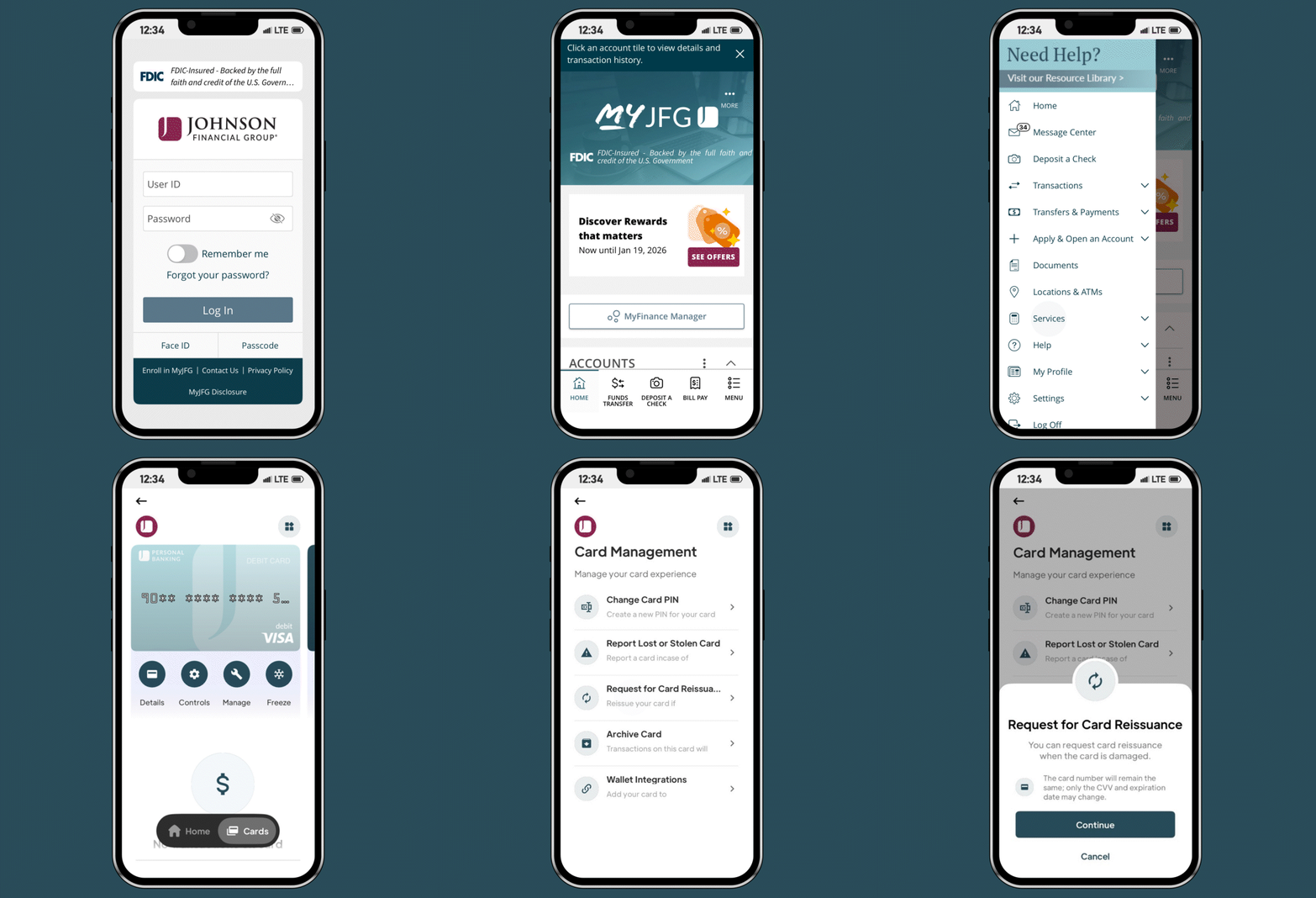
Steps to request a card reissuance
- Login to MyJFG
- Menu > Services > MyDebit Card
- Click on Cards
- Click Manage
- Click Continue
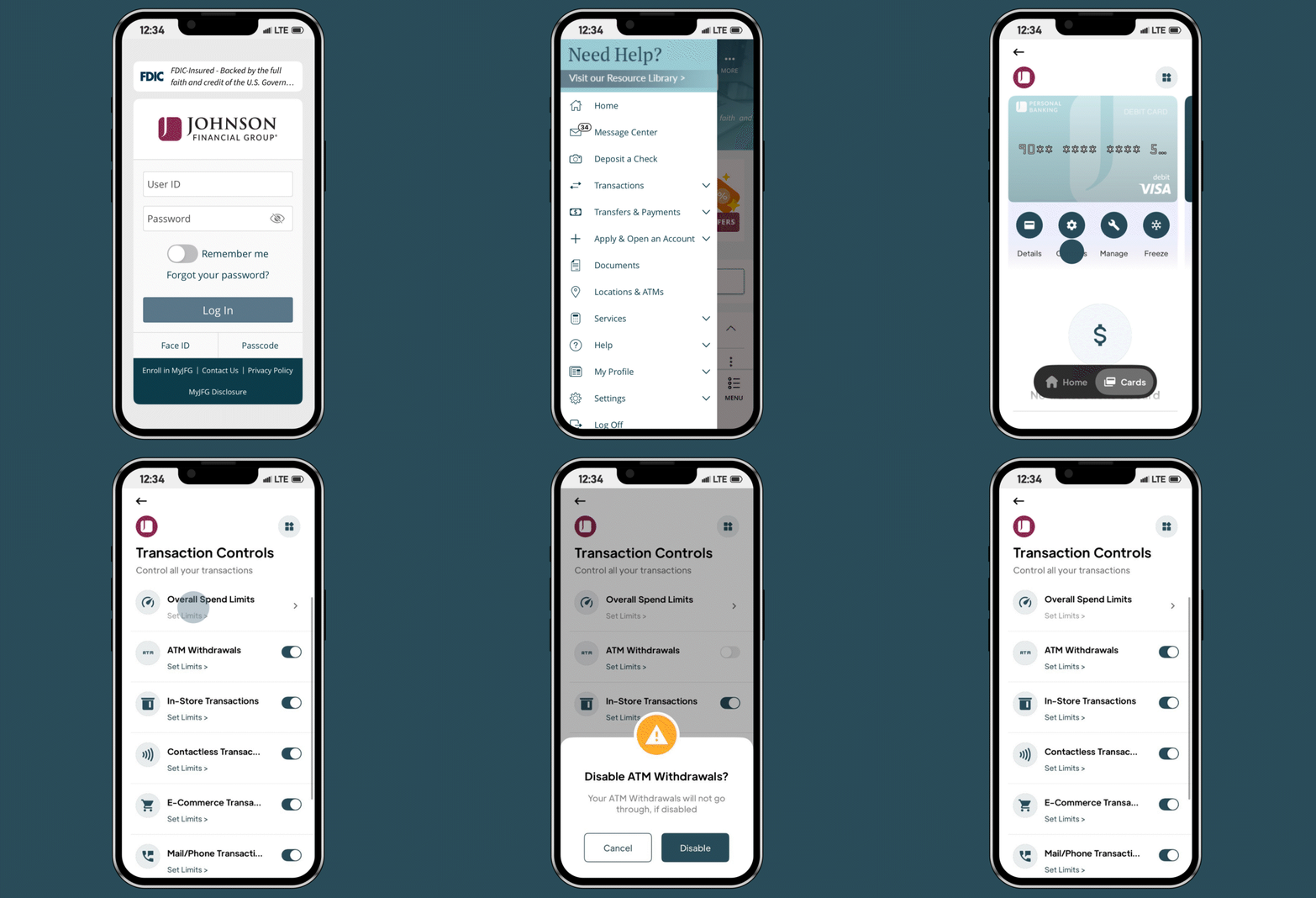
Steps to set transaction controls
- Login to MyJFG
- Menu > Services > MyDebit Card
- Click on Cards
- Click Controls
- Click Transaction Controls
- Click Overall Spend Limits
- Add any Transaction, Daily or Monthly Limits and Click Save
- Click Back arrow
- Click ATM Withdrawals
- Click Disable to prevent ATM withdrawals from Your Card
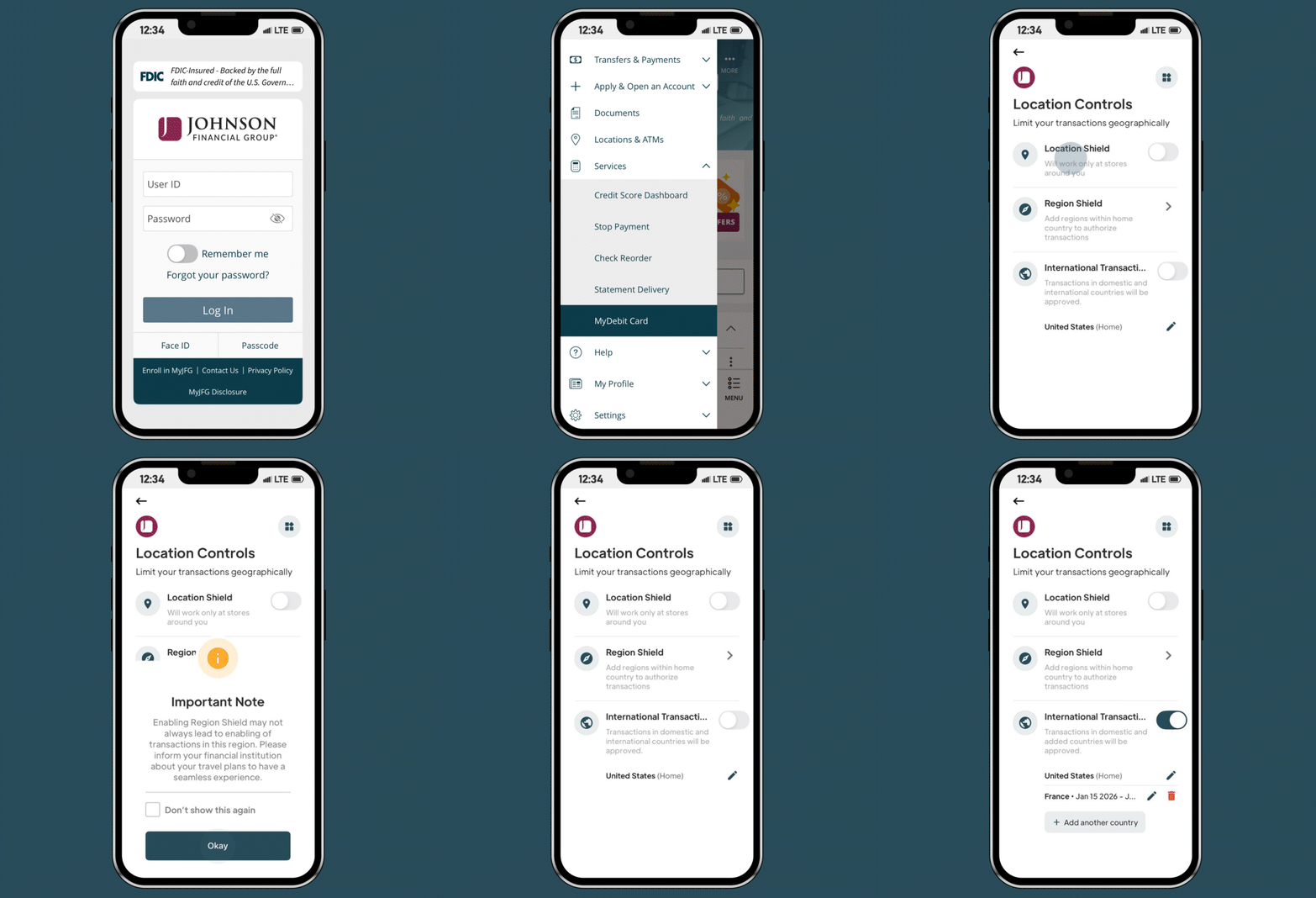
Steps to set location controls
- Login to MyJFG
- Menu > Services > MyDebit Card
- Click on Cards
- Click Controls
- Click Location Controls
- Click Location Shield to allow transactions for stores around you only
- Click Region Shield to add specific authorized regions
a. Add in your zip, city or state
b. Click Save & Continue - Add Travel Dates (Optional)
a. Click Save - View Important Note and Click Okay
a. Click back arrow at the top - Click toggle for International Travel
- Select Country from drop down
a. Select Start Date
b. Select End Date
c. Click Save - View Important Note and Click Okay
Get Started Today
Ready to protect your money and stay in control? Enroll your debit card from your MyJFG mobile app and experience the peace of mind that comes with advanced financial security.
Frequently Asked Questions
MyDebit Card is free and easy to use within the MyJFG mobile app. You’ll have full acess and control over your debit card transactions. With MyDebit Card, you can track where, how and when your debit cards are used. It offers a range of features including spending analytics, enriched merchant data, card management tools and real-time transaction notifications.
Use MyDebit in MyJFG to you to enhance your banking expereince, at no charge:
Feel more secure
- Freeze/Unfreeze your card
- Set Location Controls or Travel Controls
- Report a card lost/stolen
- Reset your PIN
- Set Spending Restrictions
- Activate or Replace a card
- Real-time debit card notifications*
Discover more convenience
- Add your cards to Apple or Google Digital Wallet
- View your Digital Debit card
- Archiving/Deleting a card
- View Debit Card activity
- View Spending summary
- ATM Finder
You can add as many cards as you would like to the application as long as the card is registered within your name.
You can register any of your debit cards including: Personal and Private Banking as well as your HELOC debit card.
Note: clients can use the Elan app to manage their credit card settings
Yes, you can freeze your card if you suspect fraud or if your card is misplaced. Freezing your card will prevent new transactions, but any automatic payments will still process. Transaction controls and alert settings take effect immediately once you set them.
Location control allows you to set specific areas where your card can be used. Here are the three different location controls and how they are used:
- Location Shield: Limits your card to a specific city or zip code.
- Regional Shield: Limits your card to a specific state or region.
- International Shield: Limits your card to specific countries.
You can use these shields simultaneously to create a customized security profile for your card.
Merchant control allows you to set restriction limits based on the type of merchant or specific merchants, including: online purchases, in-store purchase or by recurring merchants.
Spending limits help you manage your budget by restricting the amount you can spend within a specified period. To set a spending limit visit the transactions controls in MyDebit Card.
You can receive real-time debit card alerts via push notifications. The following alert categories will be available:
- Transactions
- Card Management
- Card Controls
No, you will have to register your new card number in MyDebit Card through the MyJFG mobile application.
Get Started Today
Ready to protect your money and stay in control? Enroll your debit card from your MyJFG mobile app and experience the peace of mind that comes with advanced financial security.
DOWNLOAD MYJFG